Official website

Turn Figma nodes into AI-ready implementation context.

nova-d2c is the lightweight CLI for AI coding workflows that start in Figma. Scan file structure, extract design data and Figma Variables, fold PRD context into prompts, and export image assets without dragging a docs framework into the loop.

3 commands
scan, get, images
AI-oriented output
Structured nodes, variables, prompt packaging
Distribution
GitHub Packages with global install support

$ nova-d2c scan "https://www.figma.com/design/abc123/MyFile"

pages:
  Homepage:
    frames:
      - id: "1:23"
        name: Hero Section
      - id: "1:45"
        name: NavBar

$ nova-d2c get "https://www.figma.com/design/abc123/MyFile?node-id=1-23" --prd requirements.md --prompt --output full-prompt.md

  • nodes
  • globalVars.styles
  • variables
  • devStatus
  • devNote
  • <figma-design>
Evidence-backed

All claims on this site are derived from the current CLI package, README, and shipped command surface.

No heavy frontend stack

Pure static HTML, CSS, and JS so the site can ship cleanly on Cloudflare Pages with no build step.

Built for AI coding flows

Designed around handoff to coding agents such as Claude or Codex after extracting structured Figma context.

Capability overview

Focused primitives for a real design-to-code workflow.

nova-d2c is intentionally small on the surface and high leverage in practice: three commands, one package, and outputs shaped for implementation rather than presentation.

01

Scan file structure fast

Use scan to list pages and Frame-level targets with node IDs, so you can locate the right implementation surface without opening every branch in Figma.

02

Extract implementation-grade design data

get returns structured nodes with layout, fills, text, effects, component data, handoff status, and deduplicated style references via globalVars.styles.

03

Pull Figma Variables as tokens

Local variables are grouped by collection and surfaced as design-token-ready values for colors, spacing, sizes, and other system primitives when the API is available.

04

Generate AI-ready prompts

Pass --prompt to wrap extracted data in a template with explicit implementation instructions, including the <figma-design> block expected by downstream AI tools.

05

Bring PRD context into the same handoff

Add --prd requirements.md to merge requirement sections, business rules, and API-oriented context into a single development prompt that AI agents can act on directly.

06

Export the assets that code still needs

Use images to download PNG renders or SVG assets for the same target nodes, keeping your implementation package aligned with the extracted design payload.

Workflow

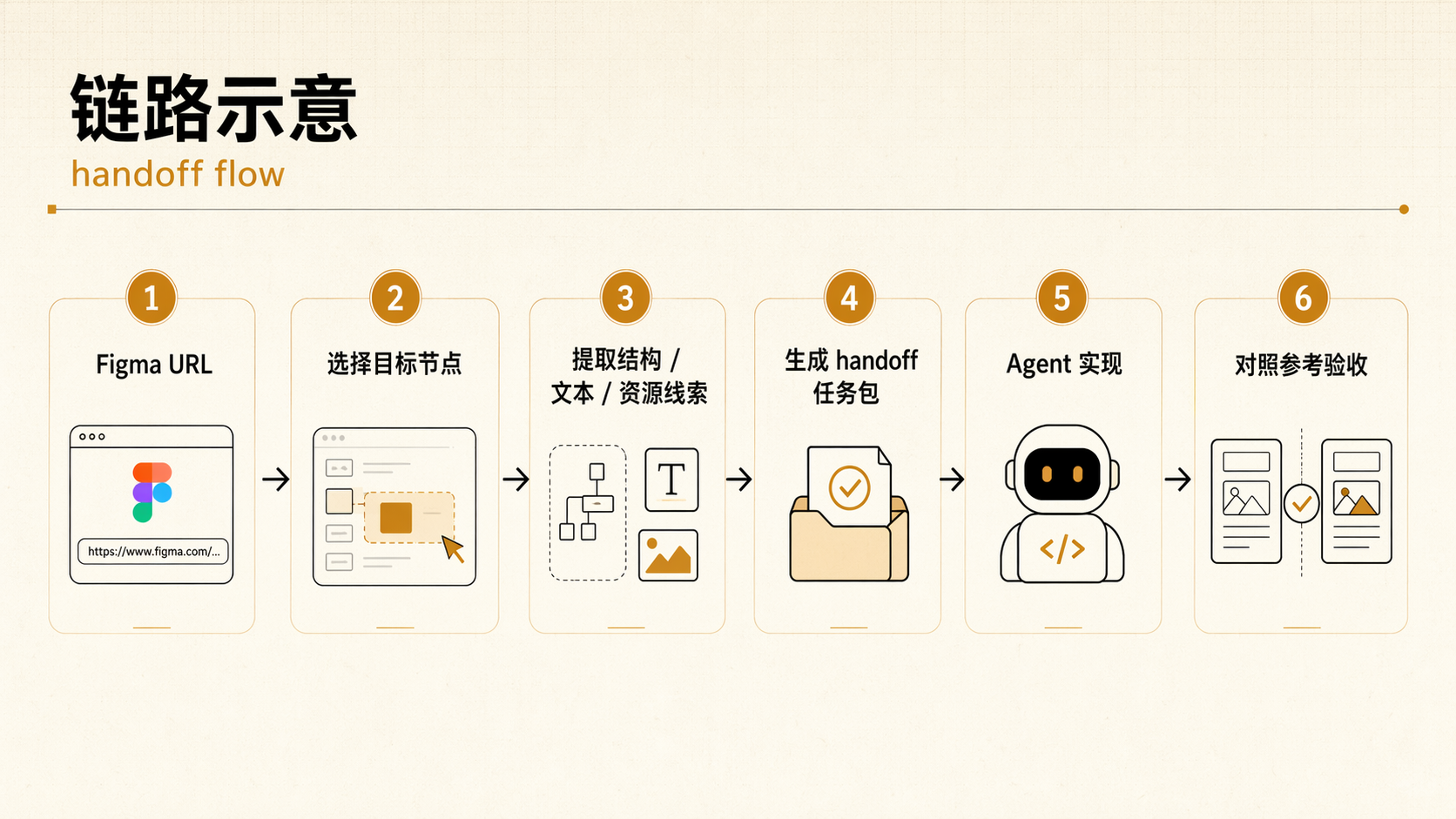
From Figma URL to implementable context in four moves.

  1. 1

    Locate the target

    Scan the file for page and frame structure to find the node IDs worth implementing.

    nova-d2c scan "https://www.figma.com/design/abc123/MyFile"
  2. 2

    Extract structured design data

    Pull nodes, style references, and variables into YAML or JSON shaped for AI consumption.

    nova-d2c get --file-id abc123 --node-id 1:23 --output design.yaml
  3. 3

    Package the prompt with product requirements

    Blend PRD context and Figma payload into a single prompt your coding assistant can execute.

    nova-d2c get "https://www.figma.com/design/abc123/MyFile?node-id=1-23" --prd requirements.md --prompt --output full-prompt.md
  4. 4

    Export images for the final pass

    Grab supporting assets like icons or rendered images in the format your build needs.

    nova-d2c images --file-id abc123 --node-id 1:23,1:45 --image-format svg --output ./icons
Install

Use the package name your automation already expects.

The CLI ships as @nova-infra/d2c-cli with the binary name nova-d2c. It is published to GitHub Packages and works cleanly in Bun-based environments.

GitHub Packages setup
@nova-infra:registry=https://npm.pkg.github.com
//npm.pkg.github.com/:_authToken=YOUR_GITHUB_TOKEN

npm install -g @nova-infra/d2c-cli
# or
bun add -g @nova-infra/d2c-cli

GitHub token access requires read:packages.

Why teams use it

Less translation work between design, requirements, and code generation.

Sharper prompts

Instead of asking AI to infer structure from screenshots alone, you hand it explicit layout, copy, effects, variables, and implementation guidance.

Cleaner design-system onboarding

Variables come through as token-like data grouped by collection, giving engineers and agents a more faithful starting point for CSS variables or system constants.

Better requirement alignment

PRD-aware prompts keep business rules and API constraints adjacent to visual data, reducing the usual disconnect between spec docs and design handoff.

FAQ + trust signals

Grounded answers for teams evaluating the CLI.

Is this a docs site or a full product app?

This website is intentionally a static official landing site for the CLI product. The package itself remains a Bun/TypeScript command-line tool; the site does not replace the README or introduce a new framework runtime.

What output formats are supported today?

The current package supports YAML and JSON for design data extraction, PNG and SVG for image export, and prompt-wrapped text output when --prompt is enabled.

Does the CLI help with tokens and handoff metadata?

Yes. The repo documents local Figma Variables extraction and includes handoff fields such as devStatus and devNote in extracted node data.

How is authentication handled?

The CLI supports token input via command flags, environment variables, config files, and interactive onboarding on first run. The README recommends FIGMA_TOKEN as the global approach.

Where is the package distributed?

The package name @nova-infra/d2c-cli is configured for GitHub Packages distribution, with the package registry declared in the repository metadata.